
How to Cancel Your K1VPN Subscription
Guide to canceling your K1VPN subscription from your dashboard, without contacting support.
Last updated:
There are cases where a customer may want to cancel their subscription for any reason. We have made this very easy for you - no need to contact us or answer unnecessary questions. The process is extremely simple and takes less than a minute.
Step 1: Log In to Your Dashboard
The username/password to log in to your dashboard are the email and password you provided during registration. If you have forgotten your password, you can reset it from the login page and create a new one.
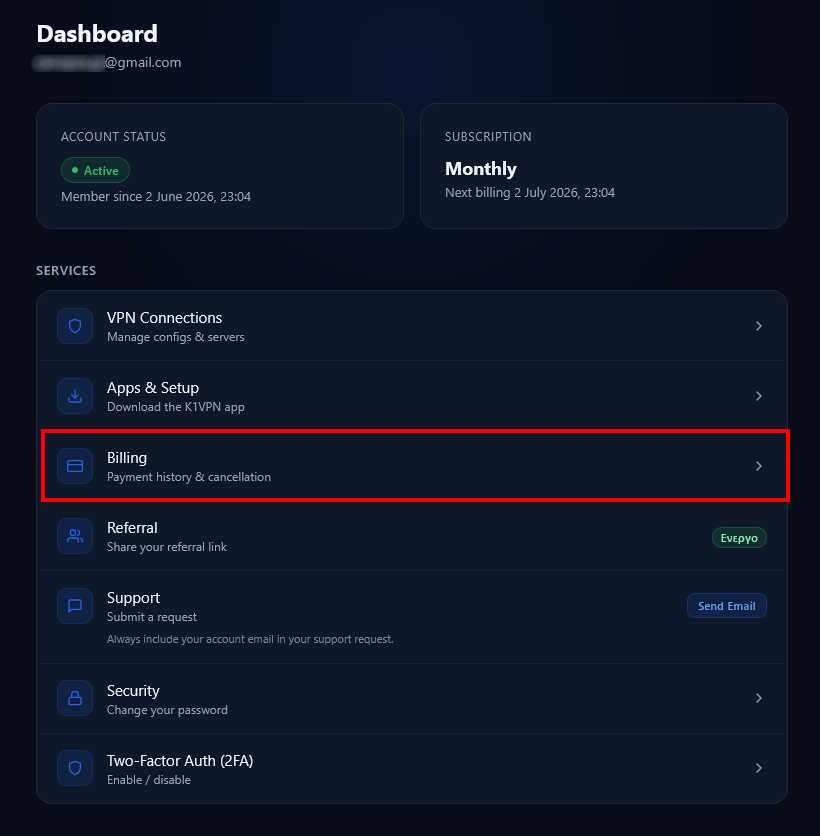
After logging in to the dashboard, select the "Billing" card.
Step 2: Cancel Your Subscription
At the top of the screen you will see the card showing your current subscription plan and its expiration date. All you need to do is click "Cancel Subscription".
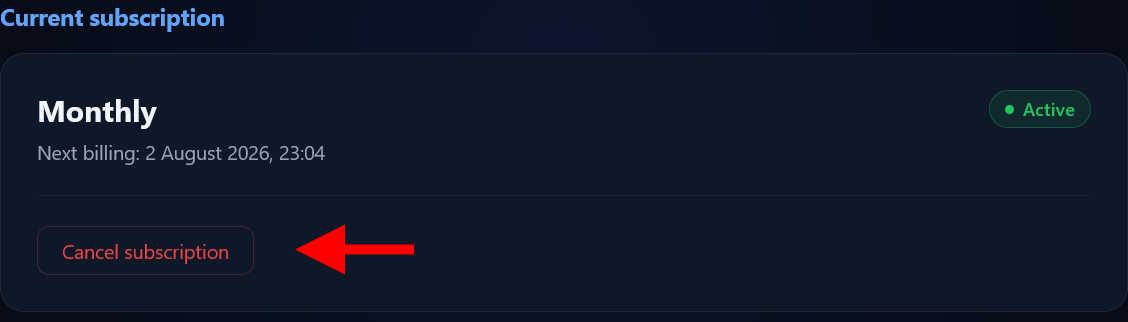
You will be asked to confirm your choice, and that's it - your subscription has now been canceled.
Note 1: Your VPN access will remain active until the end of your current billing period, which you have already paid for, and will be automatically deactivated at the end of it.
Note 2: In accordance with our Terms of Service, no refunds are issued for remaining balances. You will not be charged again. If you would also like to fully delete your account, you can see this guide.
Note 3: At any time, you can purchase a new package - either a subscription plan or a one-time access period - from the same page.
See also: How to Upgrade or Change My Plan - if instead of canceling you just want to change your plan.
For any billing questions, contact us via our contact page.